
示例环境:
- 域名:demo-site.example.com
- Webhook【1】地址:https://site-demo.example.com/webhook.php
- 仓库:demo-user/demo-site
- 服务器目录:/www/wwwroot【3】/site-demo.example.com
文件结构示例(在 /www/wwwroot/site-demo.example.com 目录下):
- deploy_config.ini.php【4】(配置文件)
- webhook【2】.php(Webhook脚本)
- webhook_deploy.log(日志文件)
可按自己喜欢的方式命名,关键是脚本要与配置文件对应上
一、整体流程
1. 配置文件:deploy_config.ini.php
; <?php die(); ?>
; 防止通过浏览器直接访问此文件。
; 如果被当成 PHP 执行,<?php die(); ?> 会立刻终止,不会泄露配置内容。

[main]
; 在 GitHub Webhook 设置中填写的 Secret 密钥(保持一致)
SECRET = "这里改成你的 Webhook Secret"

; 你的项目在服务器上的绝对路径
REPO_DIR = "/www/wwwroot/demo-site.example.com"

; 需要自动部署的分支,例如 "main" 或 "master"
BRANCH = "main"

; 日志文件的绝对路径,确保 PHP 运行用户(如 www)有写入权限
LOG_FILE = "/www/wwwroot/demo-site.example.com/webhook_deploy.log"

; 部署时执行的 Git 命令(按需修改)
GIT_COMMAND = "git pull origin main"
2. Webhook 脚本:webhook.php
<?php
date_default_timezone_set('Asia/Shanghai');

// 调试阶段可以临时打开错误输出,生产建议关闭
// ini_set('display_errors', 1);
// error_reporting(E_ALL);

ini_set('display_errors', 0);
error_reporting(E_ALL);

// --- 加载配置 ---
$config_path = __DIR__ . '/deploy_config.ini.php';
if (!file_exists($config_path)) {
    http_response_code(500);
    die('Configuration file not found.');
}

$config_arr = parse_ini_file($config_path, true);
if ($config_arr === false || !isset($config_arr['main'])) {
    http_response_code(500);
    die('Failed to parse configuration file.');
}
$config = $config_arr['main'];

// --- 日志记录函数 ---
function log_message($message)
{
    global $config;

    $log_file = $config['LOG_FILE'];
    $log_entry = '[' . date('Y-m-d H:i:s') . '] ' . $message . PHP_EOL;

    // 日志写入失败不应影响主流程,所以用 @ 静默错误
    @file_put_contents($log_file, $log_entry, FILE_APPEND | LOCK_EX);
}

// --- GitHub IP 验证(可选安全加固) ---
// 需要服务器能访问 https://api.github.com/meta
function is_github_ip($remote_ip)
{
    $cache_file = sys_get_temp_dir() . '/github_ips.json';
    $cache_ttl  = 3600; // 缓存 1 小时

    $github_ips = [];

    // 读缓存
    if (file_exists($cache_file) && (time() - filemtime($cache_file)) < $cache_ttl) {
        $github_ips = json_decode(file_get_contents($cache_file), true);
    } else {
        // 从 GitHub 官方获取 hooks IP 段
        $meta_url = 'https://api.github.com/meta';
        $options = [
            'http' => [
                'header'  => "User-Agent: PHP-Webhook-Client\r\n",
                'timeout' => 5,
            ],
        ];
        $context = stream_context_create($options);
        $meta_json = @file_get_contents($meta_url, false, $context);

        if ($meta_json) {
            $meta_data = json_decode($meta_json, true);
            if (isset($meta_data['hooks']) && is_array($meta_data['hooks'])) {
                $github_ips = $meta_data['hooks'];
                file_put_contents($cache_file, json_encode($github_ips));
            }
        }
    }

    if (empty($github_ips)) {
        log_message("ERROR: Could not fetch GitHub IP ranges.");
        return false; // 拿不到 IP 列表默认拒绝
    }

    // 当前实现仅支持 IPv4
    if (filter_var($remote_ip, FILTER_VALIDATE_IP, FILTER_FLAG_IPV4) === false) {
        return false;
    }

    $ip_long = ip2long($remote_ip);

    foreach ($github_ips as $cidr) {
        list($subnet, $mask) = explode('/', $cidr);
        $subnet_long = ip2long($subnet);
        $mask        = (int)$mask;

        if ($mask < 0 || $mask > 32) {
            continue;
        }

        $mask_bits = -1 << (32 - $mask);
        if (($ip_long & $mask_bits) === ($subnet_long & $mask_bits)) {
            return true;
        }
    }

    return false;
}

// --- 主逻辑开始 ---
$remote_ip = $_SERVER['REMOTE_ADDR'] ?? 'unknown';
log_message("Webhook received from IP: {$remote_ip}");

// 1. 只允许 POST 请求
if ($_SERVER['REQUEST_METHOD'] !== 'POST') {
    http_response_code(405);
    log_message("ERROR: Invalid request method {$_SERVER['REQUEST_METHOD']}. Allowed: POST.");
    die('Method Not Allowed');
}

// 2. 可选:验证来源 IP 是否 GitHub
// 若服务器访问不了 https://api.github.com/meta,开启这个检查会导致全部拒绝
/*
if (!is_github_ip($remote_ip)) {
    http_response_code(403);
    log_message("ERROR: IP address {$remote_ip} not in GitHub's allowed list.");
    die('Forbidden: IP address not allowed.');
}
*/

// 3. 验证签名(X-Hub-Signature-256)
$hub_signature = $_SERVER['HTTP_X_HUB_SIGNATURE_256'] ?? '';
$payload       = file_get_contents('php://input');

$secret        = $config['SECRET'] ?? '';
$expected_hash = 'sha256=' . hash_hmac('sha256', $payload, $secret);

if (empty($hub_signature) || !hash_equals($expected_hash, $hub_signature)) {
    http_response_code(403);
    log_message("ERROR: Signature verification failed. Received: {$hub_signature}");
    die('Forbidden: Signature verification failed.');
}

// 4. 检查事件类型和分支
$event        = $_SERVER['HTTP_X_GITHUB_EVENT'] ?? 'unknown';
$payload_data = json_decode($payload, true);
$ref          = $payload_data['ref'] ?? '';

$expected_ref = 'refs/heads/' . $config['BRANCH'];

if ($event !== 'push' || $ref !== $expected_ref) {
    http_response_code(200); // 非目标事件/分支,不认为是错误,但不执行部署
    log_message("INFO: Ignored event '{$event}' on ref '{$ref}'. Only handling push to {$expected_ref}.");
    die("Ignored event. Only processing push to {$expected_ref}.");
}

// --- 所有检查通过,执行部署 ---
log_message("All checks passed. Starting deployment for branch '{$config['BRANCH']}'.");

try {
    $repo_dir = $config['REPO_DIR'];
    $git_cmd  = $config['GIT_COMMAND'] . ' 2>&1'; // 把 stderr 重定向到 stdout,便于记录日志

    if (!is_dir($repo_dir)) {
        throw new Exception("Repository directory does not exist: {$repo_dir}");
    }

    chdir($repo_dir);

    $output       = [];
    $return_code  = 0;

    exec($git_cmd, $output, $return_code);
    $output_string = implode("\n", $output);

    if ($return_code === 0) {
        http_response_code(200);
        log_message("SUCCESS: Deployment successful.\n--- Git Output ---\n{$output_string}\n--- End Git Output ---");
        echo "Deployment successful.";
    } else {
        http_response_code(500);
        log_message("ERROR: Deployment failed with code {$return_code}.\n--- Git Output ---\n{$output_string}\n--- End Git Output ---");
        echo "Deployment failed.";
    }
} catch (Exception $e) {
    http_response_code(500);
    log_message("FATAL ERROR: " . $e->getMessage());
    echo "A server error occurred.";
}
3. 在服务器上生成 SSH key
对应遇到的问题三
4. 在 github 仓库 demo-user/demo-site 中配置webhook
找到仓库设置点击webhook,然后添加webhook
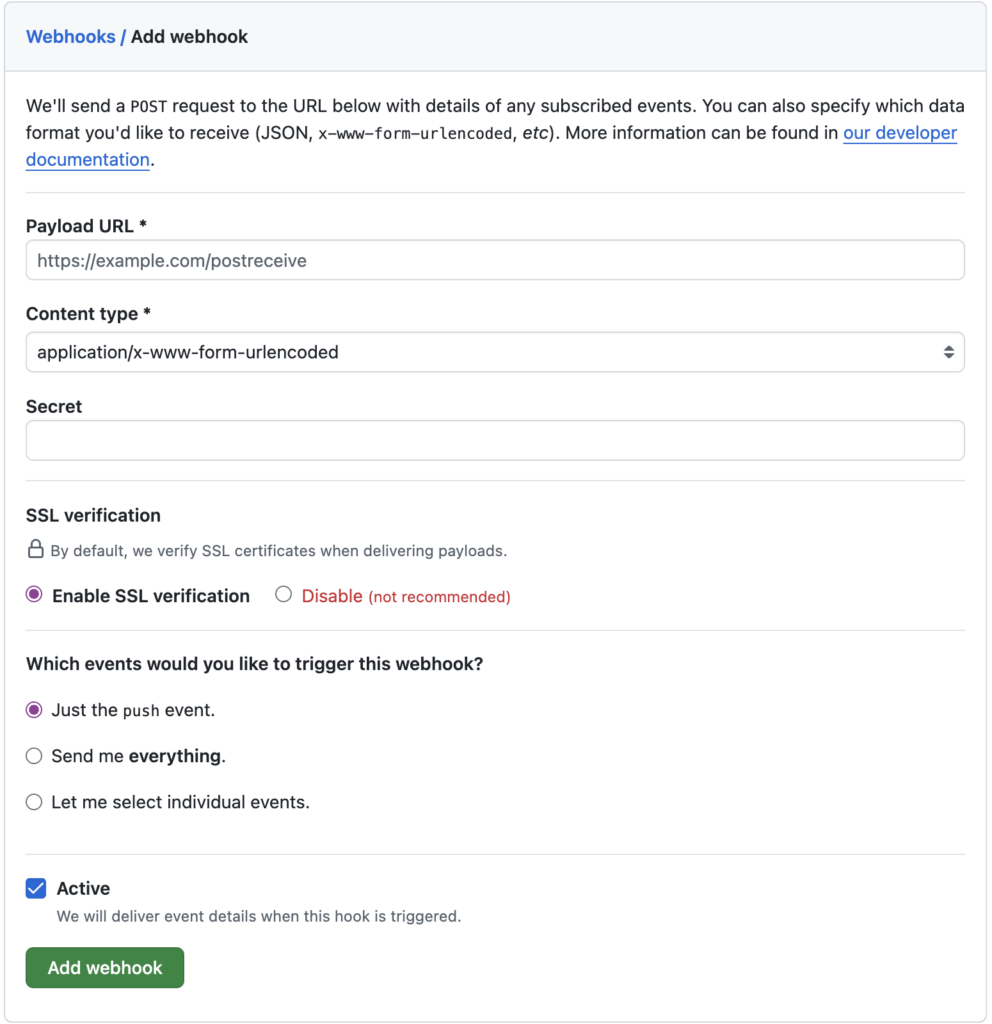
- Payload URL【5】:填 Webhook 地址(https://site-demo.example.com/webhook.php)
- Content type【6】:application/json
- Secret【7】:自定义的一串字符串(要与配置文件(deploy_config.ini.php定义的SECRET一致))
保存后 github【8】 会发送一条测试请求连接,Recent Deliveries【9】 中可看到记录

二、遇到的一些问题
1. 日志文件与权限目录
file_put_contents(./webhook_deploy.log): Failed to open stream: Permission denied原因:
- 日志文件对这个用户没有写权限
- PHP-FRP 不是root,而是普通用户(如 www)
解决:
# 以 root 或有权限用户执行
cd /var/www

# 把站点目录所有者改成 PHP 用户(示例用 www)
chown -R www:www demo-site.example.com

cd /www/wwwroot/demo-site.example.com

# 创建并授权日志文件
touch webhook_deploy.log
chown www:www webhook_deploy.log
chmod 664 webhook_deploy.log
2. exec() 被禁用
PHP Fatal error: Uncaught Error: Call to undefined function exec()原因:在 PHP 配置中,disable_functions【10】 把 exec()【11】 禁用了
解决(宝塔面板【13】示例):
在软件商店中找到自己用的PHP版本,点击设置->禁用函数,然后删除exec【12】
3. Git SSH权限:Permission denied(publickey)
git@github.com: Permission denied (publickey).
fatal: Could not read from remote repository.
原因:
- webhook.php 由 PHP-FPM【14】 用户(如 www)执行
- www 用户没有自己的 SSH key【15】,也没有对应的 Github 权限
解决:
(1)切换到 PHP 用户(如 www)
su -s /bin/bash www(2)生成 SSH key
ssh-keygen -t ed25519 -C "deploy-demo-site"
# 一路回车,不设置密码也可以
(3)查看并复制公钥
cat ~/.ssh/id_ed25519.pub(4)在GitHub仓库 demo-user/demo-site 中添加Deploy key
Settings->Deploy key【16】s->Add deploy key
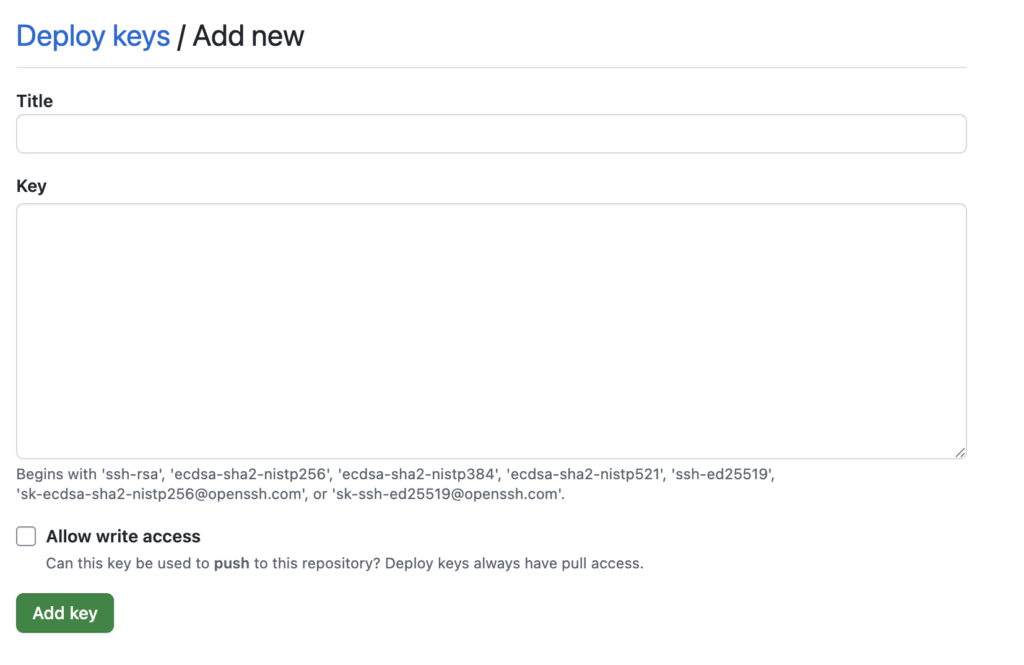
- Title:自定义
- Key:粘贴上面复制的公钥
- 勾选 Allow write access【17】
(5)测试
仍在 www 用户下shell
ssh -T git@github.com正常输出类似:
Hi demo-user! You've successfully authenticated, but GitHub does not provide shell access.
Comments NOTHING